Skip to content
Charme Dance AI

STYLE RECIPE · WEARABLE ROBOT

AI Robot Costume Halloween Look

A robot costume is easy to get wrong. The cheap version is a box with eye holes; the interesting version looks like a real person wearing a crafted suit. The difference is material, proportion and keeping the human face visible.

This look is built for motion. Metal panels catch light, LEDs give the model small highlights, and a visible face keeps the clip human instead of turning into a full CGI character.

Wearable suitHuman face visibleLED accents

Text mode opens with the robot prompt. Edit the colour or the studio, then create a free preview.

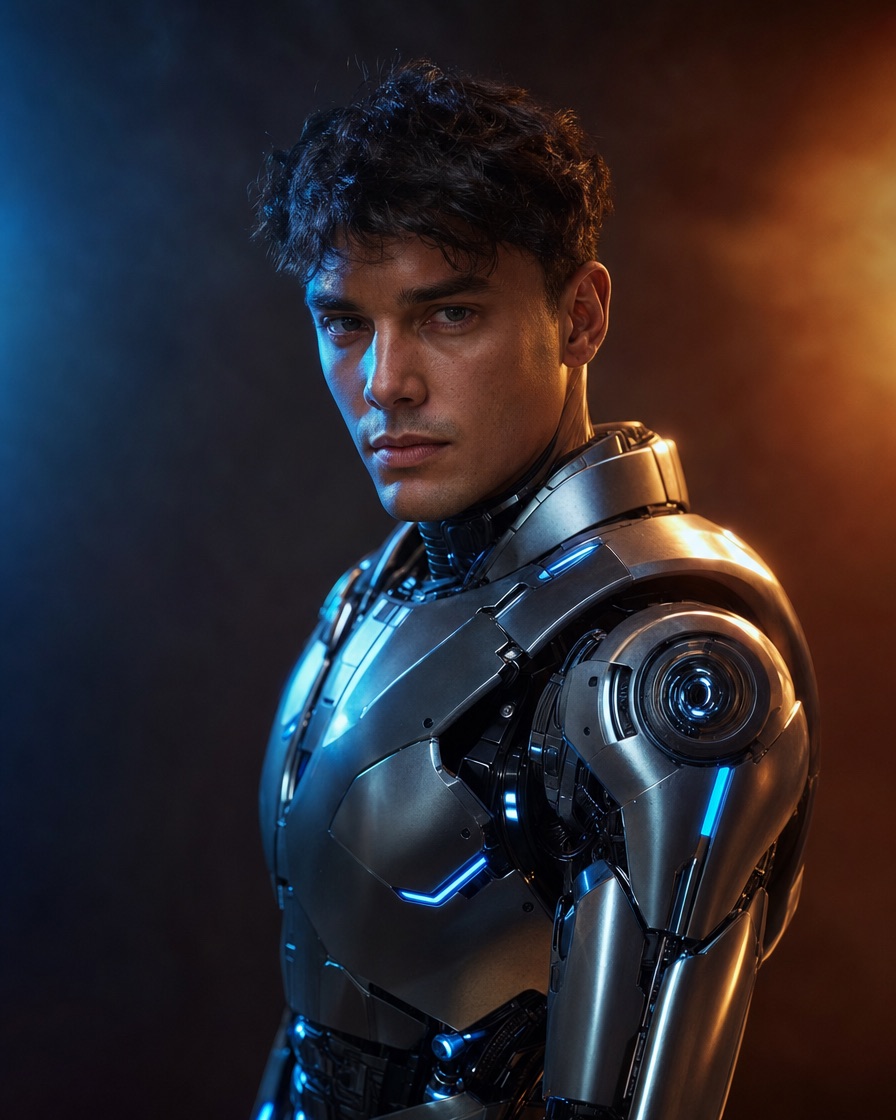
A fictional adult in a wearable robot costume with metallic panels and blue LED accents in a dark studio

Costume, not creature

The prompt asks for a believable wearable suit, so the result stays a person in a costume rather than a full robot replacement.

Readable materials

Metal panels, matte fabric and small LEDs give the model contrasting surfaces that survive video compression.

Face anchor

Keeping the face visible makes the clip feel human and avoids the uncanny full-head replacement.

How it works

  1. 01

    Open the robot prompt

    The button below opens text mode with the wearable robot prompt.

  2. 02

    Choose a scene

    Neon studio, warehouse party or a dark garage. Keep the background simple.

  3. 03

    Generate a preview

    Check that the face is still visible and the suit reads as a costume.

  4. 04

    Unlock and publish

    Download the MP4, add licensed audio and label the post as AI-generated.

Why wearable beats full robot

A full robot head removes the person from the video. A wearable suit keeps the face, which is what makes a short clip feel like a costume rather than a game cutscene.

A wearable suit also gives you a clearer prompt: armour panels over clothing, articulated shoulders, a helmet you can see through. Those are concrete objects a model can render.

  • Visible face and eyes
  • Armour panels over a real body
  • Small LEDs, not a glowing full body
  • Studio or neon party setting

The robot prompt

The default prompt uses a dark neon studio and a slow camera orbit. That gives the metal panels a moving highlight and keeps the background simple.

If you want a Halloween party scene, change the studio to a warehouse party with purple and orange lights. Keep the suit description the same.

  • Suit: metallic panels, articulated shoulders, blue LEDs
  • Face: clearly visible, recognisable
  • Scene: dark neon studio or warehouse party
  • Camera: slow orbit, full body in frame

Using a photo

Image mode can keep your face while adding the suit. Ask for a wearable costume, not a robot head, and specify that the face must remain visible.

A photo with a plain background works best because the suit adds a lot of visual detail. If the original background is busy, the frame becomes noisy.

  • Keep the face and skin tone
  • Add armour over the body, not over the face
  • Use a simple background
  • Avoid asking for a specific film robot

Details that make it look crafted

The difference between a costume and a render is usually wear and tear. Add matte fabric underneath the armour, visible seams and a few scuffs.

Keep the LEDs small. A few points of blue light read better than a fully illuminated suit, especially on a phone screen.

  • Matte under-suit
  • Visible seams and straps
  • Small blue or amber LEDs
  • Slightly worn metal, not mirror chrome
Try it yourself

Text mode opens with the robot prompt. Edit the colour or the studio, then create a free preview.

Make your Charme Dance AI video

Describe a fictional adult, the setting and the look. The relaxed Charme dance direction is already included.

Video length

Only completed videos you choose to share may be selected for the gallery. Your original photo stays private.

$19.90/ 30 credits

30 credits · 12 seconds

You have 0 of 30 credits · short 30.

Generation uses paid credits. No registration gifts or free previews.

Your videos

Your finished Charme videos will appear here. Start with a photo or describe a scene above.

Questions people ask

Will the result be a full robot or a person in a costume?

The prompt asks for a wearable costume with a visible human face, not a full robot replacement.

Can I keep my own face?

Yes. Use image mode and explicitly ask to keep the face visible while adding the suit.

Does it copy a film robot?

No. The prompt describes a generic wearable suit. Do not ask for a specific franchise robot.

What colours work best?

Blue LEDs and warm orange studio light create a strong contrast. Silver, gunmetal and matte black are the most readable materials.

Related pages

Guides that go deeper

All guides

Share this page

This is an original costume recipe. It is not affiliated with any film, game or robotics brand.

Updated October 20, 2026